Localizations
Explore the countries where the app is available and get a brief overview of the localizations for each region.
Localizations is a powerful tool for analyzing your app’s performance across multiple countries and identifying growth opportunities in new markets. It simplifies competitive research by showing how other apps perform in different regions, helping you refine your strategy.
The tool is also useful for selecting the most promising locales before release, ensuring a stronger market entry.
To access Localizations, go to ASO Tools and select App → Localizations from the top menu:
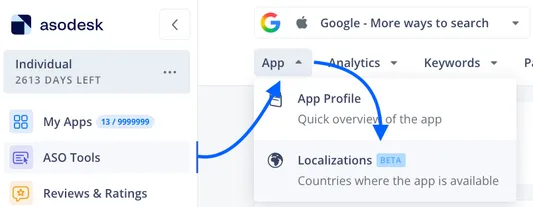
What you’ll see:
- A list of countries where your app is published.
- Data for each country: app name, subtitle or short description, app rating displayed on the store page, and the total number of ratings.
Rating data helps you understand and compare your app’s performance across regions.
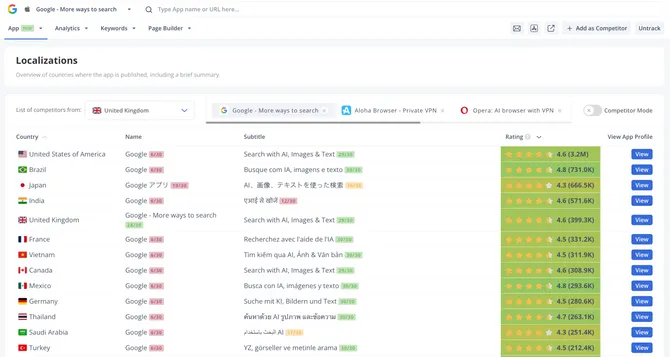
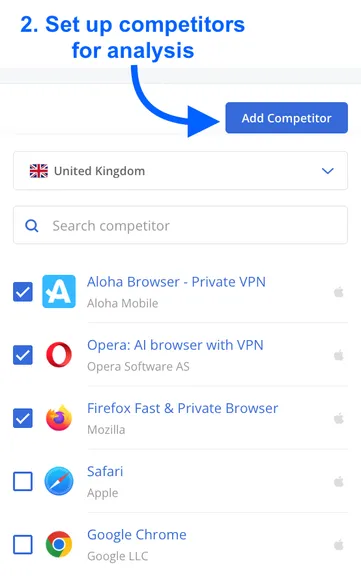
On the very same page, you can select and analyze any of your added competitors:
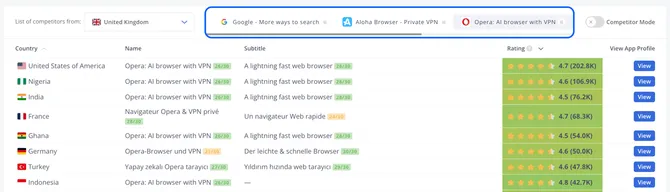
Learn more about how to add competitors to your app here.
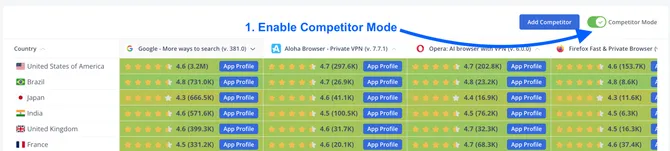
Enable Competitor Mode to compare your app’s performance with competitors you’ve added. This will help you assess your position and market reach in each country.
The Localizations tool is currently in beta, and we welcome your feedback to guide its development. Let us know what works well and where we can improve.
Need help understanding our products or services? Have a question? Let us know!
Click the support icon in the bottom right corner or write on hello@asodesk.com