
|
In this article: |
Overview
This integration allows you to respond to reviews using the Reviews & Replies Board tool in Asodesk for apps from the Huawei AppGallery. With this integration, reviews will be downloaded more frequently from your console, allowing you to process user feedback faster.
If you use the Asodesk integration with help desk systems such as Zendesk, Usedesk, or Omnidesk, you will also need to integrate with the Huawei AppGallery console to send replies to user reviews.
Huawei AppGallery functionality is activated manually by your Asodesk manager. To access Huawei AppGallery applications, contact your personal Asodesk manager or contact support using the button in the lower right corner of the screen.
Connection guide
It is necessary to perform the following steps by Account Holder or Administrator of Huawei AppGallery console to obtain the Client ID and Key needed for the integration.
- Sign in to Huawei AppGallery Connect and select Users and permissions.
-
Go to Api Key ➡ Connect API from the navigation tree on the left and click Create.
-
In the Name column, enter a custom client name (e. g. API for Asodesk). Set Project to N/A and roles Operations and Customer Support. Click OK.
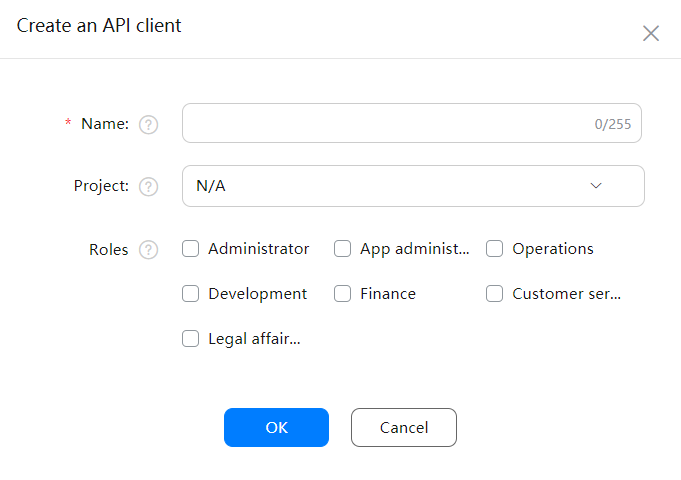
Set Project to N/A to define the API client as a team-level one. Otherwise, the integration won't work properly.
4. After the client is successfully created, copy Client ID and Key.
5. Navigate to Asodesk integrations.
6. Click on Add Huawei AppGallery Connect Account.

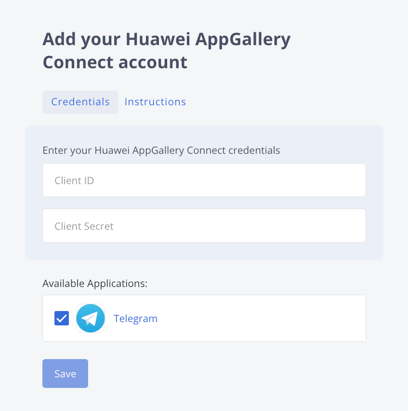
7. Enter Client ID and Key that you copied from the console.
8. Select the apps you want to connect.
Commenting Rules
Please note that Huawei AppGallery has several specific limitations for reviews and replies that may differ from other app stores. The key restrictions defined by Huawei are listed below:
- You cannot lead users to non-Huawei channels in comments and replies.
- App-related comments allow up to 800 characters, excluding any URL, QQ account, and phone number. Replies can contain QQ accounts and email addresses.
- Game-related comments and replies cannot contain any URL, QQ account, or phone number and allow up to 800 characters.
- Only comments of the last two years are retained by default.